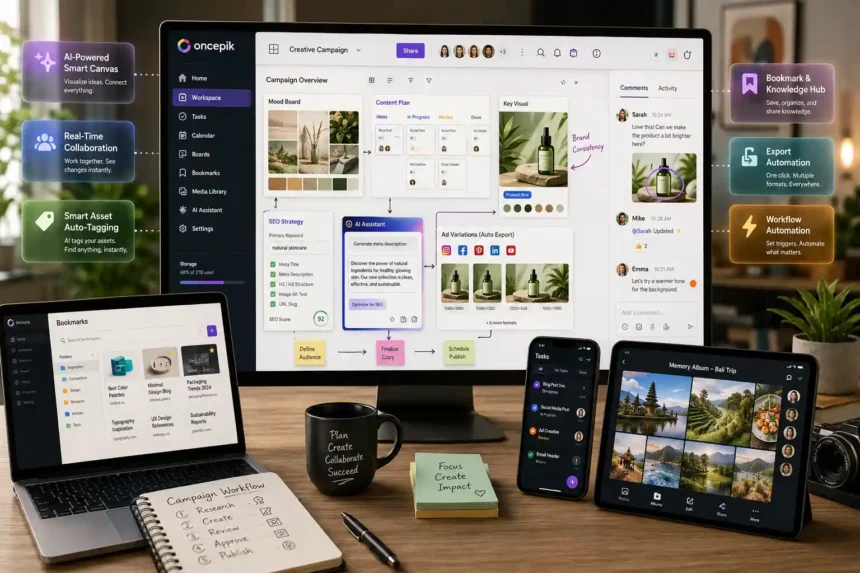
Oncepik is an AI-powered visual productivity platform that combines content creation, project management, team collaboration, bookmarking, and memory sharing in one cloud-based workspace. Instead of switching between tools like Trello, Notion, Slack, and Google Drive, users manage everything from a single, visually organized environment.
The platform serves a wide range of users — solo creators, remote teams, marketers, students, and businesses — all from the same interface. Its core design principle is simple: reduce digital clutter and help users move from idea to execution faster.
What Is Oncepik?
At its foundation, the platform operates as a visual-first digital workspace. Unlike traditional project tools that rely on linear spreadsheets and text-heavy checklists, it organizes work spatially — meaning users can see how tasks, assets, and ideas connect visually.
Each workspace functions as an intelligent environment. Users can run a content calendar, coordinate an ad campaign, manage a pillar post, or track team tasks — all without leaving the platform. The system adapts to both solo and team workflows without requiring separate software for each function.
Three things define its core identity:

- Visual organization over rigid text structures
- AI assistance is built into the workflow, not bolted on
- Unified access to productivity, collaboration, bookmarking, and memory tools
The Problem with Modern Creative Workflows
Most creators and teams lose significant time not from lack of effort, but from workflow fragmentation. Research consistently shows that context switching between tools reduces productivity by up to 40%. When work is scattered across email chains, Slack threads, cloud folders, and separate editors, the mental cost adds up fast.
Three specific friction points slow most digital workflows down:
- Cognitive exhaustion — Switching between a drafting tool, SEO analyzer, and editor multiple times per day drains focus.
- Siloed communication — Feedback buried in email chains gets disconnected from the actual visual asset it references.
- Manual repetition — Tagging, resizing, and formatting tasks consume roughly 30% of a creator’s working time — time that should go toward producing content.
Oncepik addresses these three problems directly by consolidating the tools that cause the fragmentation.

Key Features of Oncepik
Visual Workspace and Productivity Tools
The visual workspace sits at the center of the platform. Users build boards with flexible layouts, drag content between sections, and manage multiple projects from a single interactive space.
Core productivity features include:
- Task management — Create tasks, assign team members, set deadlines, and track progress without a separate app
- Pre-built templates — Jumpstart project planning, content calendars, and brainstorming sessions with ready-made board structures
- Smart Automation — The platform auto-groups related items, adjusts layout suggestions, and reduces manual effort through intelligent task organization
The Smart Canvas feature pushes this further. Rather than treating it like a basic digital whiteboard, users can perform relation-mapping — dragging an inspiration image onto the canvas automatically extracts its color palette and typography, which then links back to the brand guidelines folder within the same project view.
Real-Time Collaboration
Remote and hybrid teams get a dedicated collaboration layer. Shared workspaces allow multiple team members to work on the same project simultaneously, with live updates reflecting changes in real time.
The Pinpoint Commenting system is particularly useful. Instead of vague feedback like “make it pop,” team members can drop a comment at the exact pixel on an image. Live Cursor visibility shows who is working where, reducing communication delays and version confusion.
Version control is also built in — no more hunting through email threads to find what changed and when.
Creativity Enhancement Tools
Creative work gets specific support through:
- Drag-and-drop editors for fast layout adjustments
- Customizable templates tailored to campaigns, campaigns, or creative projects
- Multimedia support — images, videos, and text can be embedded directly into any board
- Gamified engagement — badges and challenges help maintain motivation on longer projects
- Inspiration feeds and community discovery for sourcing creative ideas without leaving the platform
The mood board feature upgrades from a static collage to an actionable dashboard. Any image or typography style pinned to a mood board can be converted into a task card — essentially briefing a designer directly from the board without a separate message.
Bookmarking and Knowledge Management
The built-in bookmarking system replaces tools like Pocket or browser bookmark folders. Users save links with tags and folders, making retrieval fast and organized.
Key capabilities:
- Cross-device synchronization across smartphones, tablets, and computers
- Collaborative bookmarking for sharing research with study groups or project teams
- A browser extension that saves links with a single click
Memory and Photo Sharing
Beyond productivity, the platform handles personal and team memory archiving. Users capture photos and videos directly in the app, contribute to collaborative albums, and apply editing tools, including filters and visual enhancements.
Storage is flexible — cloud or local — with encrypted privacy settings protecting all content.
AI-Powered Capabilities in Oncepik
Smart Canvas and Asset Tagging
The background AI continuously scans every uploaded file — image, video, or document — and generates metadata automatically through Semantic Auto-Tagging. Workspace settings allow users to toggle this on, after which the system tags content based on visual contents (e.g., flat lay, minimalist desk, product shot).
This eliminates manual database organization and makes keyword search retrieval instant, even months after the original upload.
Ghost-Write Content Integrator
The Ghost-Write feature connects visual and written content inside the same workspace. When mapping out an article layout, users can place a text box beside a main image and request the AI to generate a rough draft or SEO-optimized meta description that matches the surrounding visual context.
This bridges the gap between design teams and writers without requiring back-and-forth file sharing.
Generative Placeholders and Visual Version Control
When final photography is not yet ready, the generative AI creates high-fidelity placeholders based on a short text prompt placed into an empty image frame. These placeholders match the project’s look and feel, keeping web development and formatting on schedule.
Visual Version Control removes file-naming chaos entirely. A built-in timeline slider lets users scrub back through the canvas history and restore individual layers without overwriting current progress.
SEO Strategy Sync
Targeted keywords can be added directly into the platform’s metadata fields. The tool then ensures image filenames, alt text, H2s, and H3s surrounding content align with primary search terms before the final draft is exported to a CMS like WordPress.
Multi-Platform Exporting and Workflow Automation
Every platform — Instagram, Pinterest, YouTube Thumbnails, blog featured images — requires different dimensions. Export Matrices handle this automatically. Once a core visual asset is ready, the system auto-generates correctly cropped versions for each platform, all with SEO-friendly file names.
Workflow automation uses IFTTT-style logic. For example, when a task card moves to the Final Approval column, the SEO manager gets notified automatically, and the file is locked from further design edits. This kind of custom trigger removes the need for manual handoffs at every stage.
Benefits of Using Oncepik
| Benefit | What It Solves |
| Reduced app-switching | Consolidates tools into one platform |
| Better team communication | Visual boards and live updates improve clarity |
| Enhanced creativity | Drag-and-drop, gamified tools, and mood boards |
| Streamlined knowledge management | Tag and retrieve bookmarks and research fast |
| Cross-device access | Work from desktop, tablet, or mobile |
| Cost-effective | Reduces the need for multiple paid subscriptions |
Use Cases and Target Audiences
Individuals and Students
For personal use, the platform handles daily task management, bookmarking, study planning, and research project organization. Students benefit from collaborative bookmarking when working on group assignments, while individuals can capture and organize personal memories alongside their daily planning.
Teams, Businesses, and Creative Professionals
Marketing teams use it to coordinate campaigns, maintain editorial calendars, and manage brand consistency across content channels. Designers, writers, content creators, and educators all find dedicated workflow support. Remote teams particularly benefit from the shared workspace model, which keeps everyone aligned without email threads or separate communication apps.
How Oncepik Stands Out from Competitors
| Feature | Oncepik | Trello / Asana | Notion | Miro |
| Native Generative AI | Built-in | Plugins only | Limited | Minimal |
| Asset Auto-Tagging | Automated | Manual | Manual | Manual |
| SEO Sync | Built-in | Not available | Not available | Not available |
| Export Automation | Multi-format matrix | Not available | Not available | Manual |
| Workflow Style | Spatial & relational | Linear/list-based | Text-heavy | Infinite/unstructured |
| Memory Sharing | Yes | No | No | No |
Where tools like Asana and Trello excel at task management, they stop at visual creation. Notion handles knowledge management well, but feels static for creative workflows. Miro offers infinite canvas space but lacks structure. Substack and Discord serve niche functions — newsletters and community chats — without touching productivity.
The platform combines all of these into one cohesive workspace, which is its clearest competitive advantage heading into 2026.
Tips and Best Practices for Getting the Most Out of Oncepik
- Start with templates — Pre-built boards save setup time on content calendars and project planning
- Use folders and tags consistently — Organized bookmarks and assets make retrieval effortless weeks later
- Define roles and responsibilities early — Assigning task ownership prevents duplication and missed accountability
- Enable automation reminders — Set up automated notifications so deadlines don’t slip
- Connect third-party integrations — Link Google Drive, Slack, and calendar apps through available APIs to keep existing workflows intact
- Review and declutter regularly — Archive completed tasks and outdated bookmarks to keep boards clean
- Use community feeds for inspiration — Shared boards and topic suggestions surface ideas without leaving the platform
Challenges and Solutions
New users sometimes face a learning curve with the visual-first interface. The platform provides onboarding tutorials, help guides, and community support to accelerate that adjustment period.
Teams already using multiple tools may worry about integration complexity. The available APIs and third-party integrations — including Slack, Google Drive, and calendar apps — handle most of this without disrupting existing workflows.
Maintaining consistency across boards can also be difficult for larger teams. Editorial calendars combined with gamified engagement features help drive regular activity, while customizable layouts allow teams to create structures that balance creative freedom with organization.
Success Stories and Real-World Impact
Teams across different industries have reported measurable changes after switching to a unified workspace model. Wedding coordinators used collaborative albums to gather real-time photos from guests, capturing multiple perspectives of events in a single shared space.
Travel content creators organized memories from multiple cities into cohesive albums that doubled as shareable stories for their audiences.
On the business side, marketing teams running simultaneous campaigns used visual boards to integrate bookmarks, tasks, and content drafts into one workspace — reducing time from briefing to publish and improving efficiency without adding headcount.
Future Potential of Oncepik
The platform’s development roadmap points in a clear direction. Upcoming priorities based on current signals include:
- AI-driven content curation — Smarter task prioritization, automated tagging improvements, and personalized content recommendations
- Augmented Reality (AR) — Users may view memory albums and project boards in immersive 3D environments
- Expanded integrations — Broader connectivity with third-party tools across professional and educational ecosystems
- Advanced analytics and reporting — Deeper insight into workflow performance and content output
- Improved mobile and desktop accessibility — Seamless cross-device experience for users working on the go
Conclusion
The platform consolidates productivity, creativity, collaboration, bookmarking, and memory sharing into one digital ecosystem. For teams tired of juggling Trello, Notion, Slack, Google Drive, and separate design tools, it offers a practical alternative with AI built into the core workflow.
Whether managing a boutique agency, scaling a content operation, or organizing personal projects, Oncepik provides the structure and flexibility to move faster without adding complexity. The combination of smart automation, multimedia support, real-time collaboration, and cross-device access makes it genuinely useful rather than just feature-rich.
FAQs
What is Oncepik and who is it designed for?
It is a visual productivity and collaboration platform built for solo creators, teams, students, businesses, and creative professionals. It scales from individual task management to complex multi-team workflows.
How does the AI-powered Smart Canvas work?
The Smart Canvas lets users perform relation-mapping on a visual board. Dragging an image onto the canvas extracts its color palette and typography automatically, linking those assets directly to the project’s brand guidelines folder.
Can it replace tools like Trello, Notion, and Asana?
For many teams, yes. It combines task management, visual creativity, content creation, and collaboration into one workspace, removing the need to run Trello, Notion, and a separate design tool simultaneously.
Does the platform support SEO optimization?
Yes. Users can input targeted keywords into metadata fields. The system aligns image filenames, alt text, and surrounding H2s and H3s with those terms before exporting content to a CMS like WordPress.
How does it handle data privacy and AI training?
The platform uses enterprise-level encryption and allows users to opt out of having their private workspace data used to train external AI models.
Can it integrate with WordPress or other CMS platforms?
Yes, through available APIs. Final text blocks and visual assets — including optimized headers and alt text — map directly into CMS drafts without requiring manual HTML restructuring.
What automation features are available?
Core automation includes Semantic Auto-Tagging, IFTTT-style workflow triggers, automated reminders, export matrix generation, and smart task grouping with layout adjustments.
What does the future of the platform look like?
Development focus includes smarter automation logic, deeper AI optimization, augmented reality (AR) viewing for project boards and albums, expanded third-party integrations, and improved analytics and reporting features.