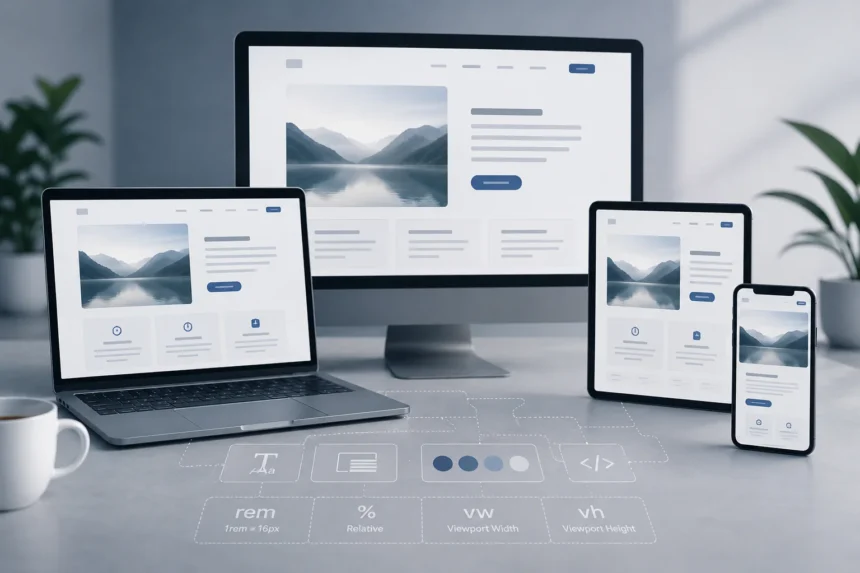
Pxless is a design and development philosophy that reduces dependence on fixed pixel measurements and replaces them with scalable, relative units. Instead of defining every element by an exact pixel count, pxless design allows layouts, typography, and spacing to adapt based on screen size, container dimensions, or user preferences. The result is a digital interface that stays readable, balanced, and functional across any device.
What Is Pxless?
The word itself combines “px” (the CSS shorthand for pixel) and “less,” meaning less reliance on rigid pixel values. Traditional digital design used fixed measurements everywhere — a button might be exactly 200px wide, a heading set to 24px, a container locked at 1200px. That approach made sense when most users browsed on similar desktop monitors.
Device diversity changed everything. Screens now range from 6-inch smartphones to 32-inch monitors, with tablets, foldables, smart TVs, and wearables sitting in between. A fixed layout that looks sharp on one screen often breaks badly on another.
Pxless design solves this by treating interfaces as flexible systems rather than static screens. Elements are defined by their relationships — how wide something is relative to its container, how text scales relative to a root font size — not by absolute numbers.
The Origin and Evolution of the Term
The shift toward pixel-free thinking began long before the term pxless became common. Ethan Marcotte introduced responsive web design in 2010, which encouraged fluid grids over fixed layouts. Even then, many designers still anchored their work to pixel-based breakpoints like 320px, 768px, and 1024px.

The real evolution came with browser support for CSS units like rem, em, vw, and vh, combined with layout tools like Flexbox and Grid. These technologies made it possible to build interfaces that scaled naturally without defining every element in pixels.
Pxless represents the full expression of that evolution — not just responsive design, but a design system built from the ground up on relative values and fluid behavior.
Why Pxless Matters in Modern Design
Fixed pixel layouts struggle in the current device landscape. A design built around exact pixel values requires constant adjustment as new screen formats appear. Pxless removes that burden by building adaptability directly into the design structure.

Device Diversity and Screen Fragmentation
The average user switches between multiple screens daily. A product viewed on a Retina-display MacBook may also open on an older Android phone or a 4K television. High-resolution displays make fixed pixel layouts appear inconsistent — elements designed at standard pixel density often look oversized or improperly scaled on ultra-sharp screens.
Pxless architecture handles this without manual intervention. Because sizing is proportional rather than absolute, the same layout scales correctly across wildly different environments.
Accessibility and User Preferences
Many users rely on browser zoom, larger system font sizes, or screen readers. When a layout is built with fixed pixel heights and widths, zooming can cause text to overflow, buttons to overlap, and containers to break entirely.
Relative units like rem respect the user’s base font size setting. Layouts built with fluid grids and scalable typography continue to work correctly when someone increases their text size for visual comfort or accessibility reasons.
SEO and Performance Impact
Search engines reward responsive, lightweight, mobile-friendly pages. Pxless implementations typically produce cleaner CSS — fewer media query overrides, less device-specific code, and no redundant layout rules for each screen breakpoint.
That leaner codebase means faster page load times, better Lighthouse accessibility scores, and lower bounce rates. In competitive search environments, those gains matter.

Core Principles of Pxless Design
Pxless is not a single technique — it is a set of principles applied consistently across a design system. Content drives layout, not the other way around. Proportional relationships replace absolute numbers at every level.
Relative Units Over Fixed Pixels
The foundation of pxless design is unit choice. Instead of pixels, designers use:
| Unit | What It Scales With |
| rem | Root (HTML element) font size |
| em | Parent element font size |
| % | Parent container dimensions |
| vw / vh | Viewport width / height |
A button defined as 50% of its container will always occupy half that space, regardless of whether the container is 400px or 1200px wide. That single change eliminates an entire category of breakpoint-related fixes.
Fluid Grids and Flexible Layouts
CSS Grid and Flexbox enable layouts that reorganize themselves based on available space. Functions like minmax() and auto-fit let columns expand or collapse without a single pixel breakpoint.
Single-axis content flows naturally with Flexbox. Two-dimensional structures — dashboards, card grids, editorial layouts — are better handled with CSS Grid. Together, they replace rigid containers with layouts that behave predictably across all screen sizes.
Fluid Typography and Spacing
The clamp() function is one of the most practical tools in pxless design. It defines a minimum size, a preferred fluid size, and a maximum size for any typographic property.
For example, a heading might scale smoothly between 18px on small screens and 36px on large displays, with no breakpoints required. Margins and padding set in em or rem scale proportionally alongside the text, keeping visual rhythm intact regardless of device.
Design Tokens and Design Systems
Design tokens are variables that store spacing, color, font size, and other values in relative or ratio-based terms rather than hardcoded pixels. A spacing token defined as “2 units” means something consistent across every component, regardless of context.
Pxless design systems built on token-based architecture scale cleanly when applied across multiple products or platforms. A single shared system can power a web app, a mobile app, and a documentation site without inconsistency — because no component carries pixel-locked assumptions.
Pxless vs. Traditional Pixel-Based Design
The practical difference between the two approaches becomes obvious in production environments.
| Aspect | Pixel-Based | Pxless |
| Unit type | Fixed px values | rem, em, %, vw, vh |
| Responsiveness | Requires manual breakpoints | Fluid by default |
| Accessibility | Often breaks on Zoom or large text | Scales with user settings |
| Maintenance | High — per-device adjustments | Low — flexible structures adapt |
| Future-proofing | Limited | Handles new form factors naturally |
Consider a SaaS dashboard built entirely with fixed pixel widths. The moment users access it on a high-resolution monitor or a tablet, layout issues appear — columns overflow, text becomes too small, and buttons are difficult to tap. A pxless rebuild defines those same columns as proportional fractions of their container, which removes the problem at its root.
Real-World Benefits of Pxless
Design teams that adopt pxless principles report consistent improvements across several dimensions:
- Faster development — flexible layouts require fewer manual adjustments per screen size
- Reduced maintenance — adaptive systems don’t need rebuilding every time a new device becomes popular
- Better user experience — content stays readable and balanced across all conditions
- Stronger branding — fluid systems maintain visual identity across breakpoints without pixel-level intervention
- Improved SEO — responsive, lightweight pages perform better in search and load faster for users
How to Implement Pxless in Your Projects
Conducting a Pxless Audit
Start by identifying where your current design system relies most heavily on fixed pixel values. The common culprits are:
- Font sizes set in px instead of rem or clamp()
- Container widths defined with hardcoded values like 1200px
- Spacing (padding, margins) using static numbers unrelated to the typography scale
- Breakpoints based strictly on device pixel widths rather than content behavior
This audit clarifies which areas offer the most value from a pxless conversion and where fluid design ranges can replace rigid rules.
Building a Pxless Foundation
Once the audit is complete, rebuild the design system from relative values outward. Define design tokens for spacing, typography, and color in ratio-based terms. Apply rem to all global font sizes so the entire typographic hierarchy scales from a single root setting.
Use CSS Grid for page-level layout and Flexbox for component-level flow. Introduce clamp() for heading sizes and body text so scaling happens smoothly between minimum and maximum boundaries without requiring breakpoint-specific overrides.
Best Practices and Tools
Several tools make pxless workflows practical:
- Figma with auto-layout and responsive resizing handles component-level fluid behavior during design
- Adobe XD and Webflow support design tokens and responsive components
- Tailwind CSS makes it straightforward to apply relative units and adaptive spacing utilities
- React, Vue, and Svelte support component-driven architecture that pairs well with a pxless token system
- Browser dev tools with responsive testing modes let you verify fluid behavior across viewport ranges quickly
Container queries — a relatively new CSS feature — take pxless precision further by allowing components to respond to their parent element’s available space rather than the full viewport width.
Overcoming Challenges in Pxless Design
Learning Curve and Mindset Shift
The most common barrier is not technical — it is habitual. Designers trained on pixel-perfect workflows initially find relative units harder to visualize. The shift requires thinking in proportional relationships rather than fixed numbers.
This is manageable with clear team documentation. Style guides that define pxless conventions for spacing, scaling, and typography create shared understanding between designers and developers, which reduces inconsistency during implementation.
Consistency and Stakeholder Resistance
Fluid layouts can produce unexpected visual differences across devices, especially when clamp() ranges are not tested thoroughly. Setting minimum and maximum constraints on type and container sizes prevents extreme behavior at unusual viewport widths.
Stakeholders accustomed to seeing pixel-perfect mockups may resist the transition. The most effective response is demonstrating measurable outcomes — improved Lighthouse scores, reduced bounce rates, and fewer post-launch layout bug reports. Results carry more weight than explanations.
Real-World Examples of Pxless in Action
Several major design systems already apply pxless principles at scale:
Figma auto-layout enforces relationship-based sizing rather than fixed artboard dimensions. Designers define how components expand and contract, not how many pixels wide they sit.
Google’s Material Design 3 uses dynamic color, fluid grids, and responsive type scaling. Components adapt to screen size and user accessibility settings without requiring separate pixel-defined templates.
Apple’s Human Interface Guidelines for macOS and iOS emphasize adaptable spacing and scalable type systems. The guidance explicitly moves away from pixel rigidity toward device-agnostic layout logic.
In production, content-heavy platforms — editorial sites, documentation hubs, SaaS dashboards, e-commerce product pages — benefit most visibly. Layouts built on fluid systems degrade gracefully when content changes or screen conditions shift.
Future Trends in Pxless Design
The next phase of pixel-free design aligns with emerging interface paradigms:
Container queries allow individual components to respond to the size of their parent container rather than the full viewport — a more precise control mechanism than traditional media queries.
Variable fonts let a single font file adjust weight, width, and optical size dynamically, removing the need for multiple static font assets in a responsive system.
AI-powered design tools are beginning to generate optimal spacing, layout, and scaling suggestions automatically, using pxless architecture as their foundation.
Spatial computing — AR, VR, and mixed-reality interfaces — has no fixed screen size in the conventional sense. Designs built on relative, adaptive principles transfer to these environments far more cleanly than pixel-locked layouts.
PxLess in PhysX (NVIDIA)
The term “PxLess” also appears in a completely separate technical context. In NVIDIA’s PhysX SDK 5.1.0, PxLess is a C++ struct defined in PxBasicTemplates.h. It is a templated comparison operator struct — essentially a utility used internally for sorting or comparing physical simulation objects.
This PxLess struct has no connection to design philosophy. It uses a Boolean operator() to compare two objects of the same type. If you landed on this page looking for NVIDIA PhysX API documentation, the struct reference is located within the foundation headers of the PhysX 5.1.0 C++ API, last updated November 2022.
Conclusion
Pxless design replaces pixel-locked rigidity with systems built on proportion, relationships, and adaptability. It is practical — reducing maintenance costs, improving accessibility, and preparing interfaces for devices that do not yet exist. The tools are available now: rem, clamp(), CSS Grid, Flexbox, design tokens, and container queries form the complete foundation.
The competitive advantage is real. Products built on pxless principles require fewer emergency fixes, scale to new platforms faster, and deliver more consistent user experiences across an increasingly fragmented device landscape. Starting small — converting typography and spacing to relative units — is enough to see the difference quickly.
FAQs
What does pxless mean in simple terms?
Pxless means designing digital interfaces without relying on fixed pixel measurements. Instead of setting exact sizes in pixels, it uses relative units like rem, em, and vw that adapt automatically to different screens and user settings.
Is pxless only for web design?
No. Pxless principles apply equally to mobile apps, software interfaces, AR/VR environments, and wearable displays. Any digital product that serves users across varied screen conditions benefits from the approach.
Does pxless reduce design quality or precision?
Precision remains — it simply shifts from absolute pixel counts to consistent ratios and rules. A button defined as 30% of its container is just as predictable as one set to 300px, and it behaves correctly on every screen without adjustment.
What CSS units are used in pxless design?
The most common units are rem (relative to root font size), em (relative to parent font size), % (relative to container), and vw/vh (relative to viewport). The clamp() function combines these to create smooth scaling between minimum and maximum size boundaries.
How is pxless different from responsive design?
Responsive design adapts layouts at specific pixel breakpoints using media queries. Pxless goes further by building fluid scaling into the base structure itself — layouts respond to content and container size continuously, not just at predefined screen widths.
What tools support pxless workflows?
Figma, Adobe XD, and Webflow support design tokens and responsive components. On the development side, CSS Grid, Flexbox, Tailwind CSS, and frameworks like React and Vue pair well with pxless token systems.
What are the main challenges of adopting pxless?
The primary challenges are the mindset shift from pixel-perfect habits, legacy codebase migration, browser compatibility for newer CSS features like container queries, and stakeholder expectations around “pixel-perfect” deliverables. Most are manageable with documentation and incremental implementation.
What is PxLess in the context of NVIDIA PhysX?
In NVIDIA’s PhysX SDK 5.1.0, PxLess is a templated C++ comparison struct defined in PxBasicTemplates.h. It provides a boolean operator() for comparing simulation objects and is unrelated to the web design concept of pixel-free layouts.